
for your events
Marcom eSchedule PRO
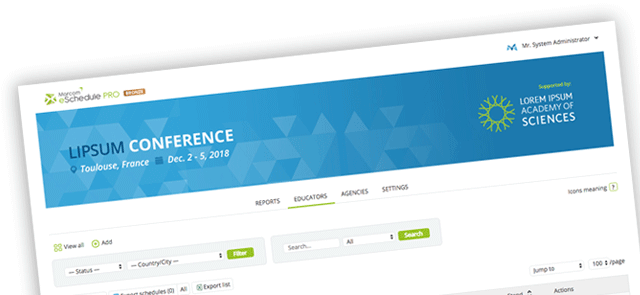
Marcom eSchedule PRO can handle up to four participant categories with various contact rules. Its unique features include our Time Matching Wizard, Meeting Location Manager and account linking tool.
Because it is web based, Marcom eSchedule PRO requires no technical set-up on your part. We simply work closely with your team to quickly adapt the solution to your specific needs, such as customizing the log-in page for each event.
We can connect to your participant database to keep the information up to date at all times. We can also simply import the data once and you can then maintain it via the password-protected organizer interface.
Marcom eSchedule PRO is currently available in English only.
Type of events
- B2B events with 1-4 participant categories (for example, buyers, sellers, exhibitors and sponsors)
- For 100+ participants
- Events that need rich profiling for easy matchmaking
- Fixed or flexible meeting locations (for example, numbered tables or booths)
Testimonials
Marcom eSchedule PRO’s unique features
Time Matching Wizard
As the event gets closer, participants have fewer common time slots available. Our proprietary Time Matching Wizard suggests solutions to find a matching timeslot. Users simply choose the best option for them and the system automatically reschedules.
List management
Participants can easily compile up to 10 lists. They can then perform group actions on all participants within a list.
Account linking tool
Representatives from the same organization can link their accounts when they attend an event. They can see colleagues’ schedules, join meetings, transfer meetings and even reply to their meeting requests.
Meeting Location Manager
Whatever the event format, our Meeting Location Manager can handle all situations: shared numbered tables, booths, meeting points and so on.
Marcom eSchedule PRO’s main benefits
For event organizers
- Add value for participants by offering a state-of-the-art meeting scheduler.
- Closely monitor the scheduling process via detailed statistics.
- Easily manage participant lists (add/edit/delete participants).
- Identify and assist participants with fewer meetings.
- Post messages for participants and send text messages (SMS) for urgent communications.
- Export all schedules to PDF/iCal/Excel.
- MAP IT funtion (optional)
Read the detailed list of benefits for event organizers.
For event participants
- Attendees keep full control over their schedule and rich profile.
- Set up and manage their own priority lists.
- Request appointments with personalized messages and save message templates.
- View their colleagues’ schedules and join or transfer meetings.
- Export their schedule to PDF.
- Schedule meetings in two clicks via PC or smartphone.
- Synchronize with their smartphone.
Read the full detailed list of benefits for event participants.
Technical services and support
As part of the Marcom eSchedule PRO package, we:
- Set up the application (agenda, categories, meeting location manager, sponsors, email templates and more)
- Import participant lists or sync with your registration database
- Provide hosting and server monitoring, as well as a secure database and back up
- Offer outstanding functional and technical support.
Case studies
Read our case studies for:
- Buyers-meet-sellers events
- Hosted buyer programs
- Meeting scheduler for expos.
Related scheduling solution
Benefits for event organizers
- All event and participant information at your fingertips on mobile devices
- Manage participants’ schedules
- Post alerts for participants and send messages for urgent communications.
Benefits for event participants
- Stay connected at all time during the event
- Optimize schedule to further improve ROI
- Take private notes on any devices
- View all meetings made via Marcom eSchedule PRO
- Schedule last-minute meetings (opt-in required)
- Send messages to other participants
- Take notes in offline mode
- Access practical information via My Guide
- Learn about event sponsors
- Contact event organizers
More information
- Get a free demo to try Marcom PRO and Marcom Onsite for yourself.
- Ask for a quote using our easy contact form.
- Recommend Marcom eSchedule PRO to a B2B meeting or event organizer.
-
Need more help?
-
Want to try?
-
Want prices?
-
Want to recommend us?
Meeting scheduler for B2B events
-
 We have been using the Marcom's registration and agenda builder software since 2006. Their software has revolutionised the way we are able to deliver the conference. I'd fully recommend Marcom to everyone.

-
We have been using the eSchedule PRO appointment scheduling system since May 2005 and must say that we are extremely happy, not just with the system itself which is excellent and state of the art, but also with the friendly, service-minded attitude and the total professionalism of the Marcom team.
-
You were amazing to work with and the meeting scheduling aspect of the event received the highest praise from both hotel partners and Tour Operators. Thank you.
-
Effective solution, a very reactive team, who has been attentive and flexible to best adapt to our expectations. We look forward to renewing the experience.eSchedule Lite.
-
The Marcom eSchedule PRO appointment making system has become central to the success of the IALC Workshop. By constantly innovating Marcom makes using the system an enjoyable experience for both delegates and organisers...
Our clients






















 © 2000-2026. Marcom Connect - Marcom Consulting SAS. All rights reserved
